Free download · Windows
Download EstateLedger
Load the estate's bank statements, reconcile every account to the penny and review everything the rules flag — all of it free. You pay once, $59, only when you're ready to export the finished workbook. If it doesn't do what you need, you'll know before you've spent anything.
Heads up: your browser will probably block this download, and Windows will warn you again on first run. Neither is a virus detection — it's because the file is new and isn't code-signed yet. Here's exactly what you'll see and what to click.
What's free and what costs $59
There is no trial clock and no crippled demo mode. Everything except the final export is fully working, on the real statements, for as long as you need.
Free, with no time limit
Import CSV statements for every account · map your bank's columns · detect duplicate and overlapping statements · reconcile opening + activity = closing for each account · see every flagged item with the reason it was flagged · classify each one as an estate expense, a distribution, personal, or needing documentation · match transfers between the estate's own accounts · read the whole accounting on screen.
$59 one-time, per estate
Export the nine-sheet workbook — the document you actually hand to beneficiaries, your attorney, or the court. One payment per estate, not a subscription. Software bought to administer an estate is generally a reimbursable administration expense, so keep the receipt.
See the workbook before you download anything
This is a real export, produced by the software from the demo estate that ships inside it — Arthur Pembroke, four accounts, fourteen months of statements. Open it and you'll see exactly what your own estate's workbook will look like. Prefer to keep the books by hand? There is also a free blank estate accounting template.
Download the sample workbook (.xlsx, 43 KB)
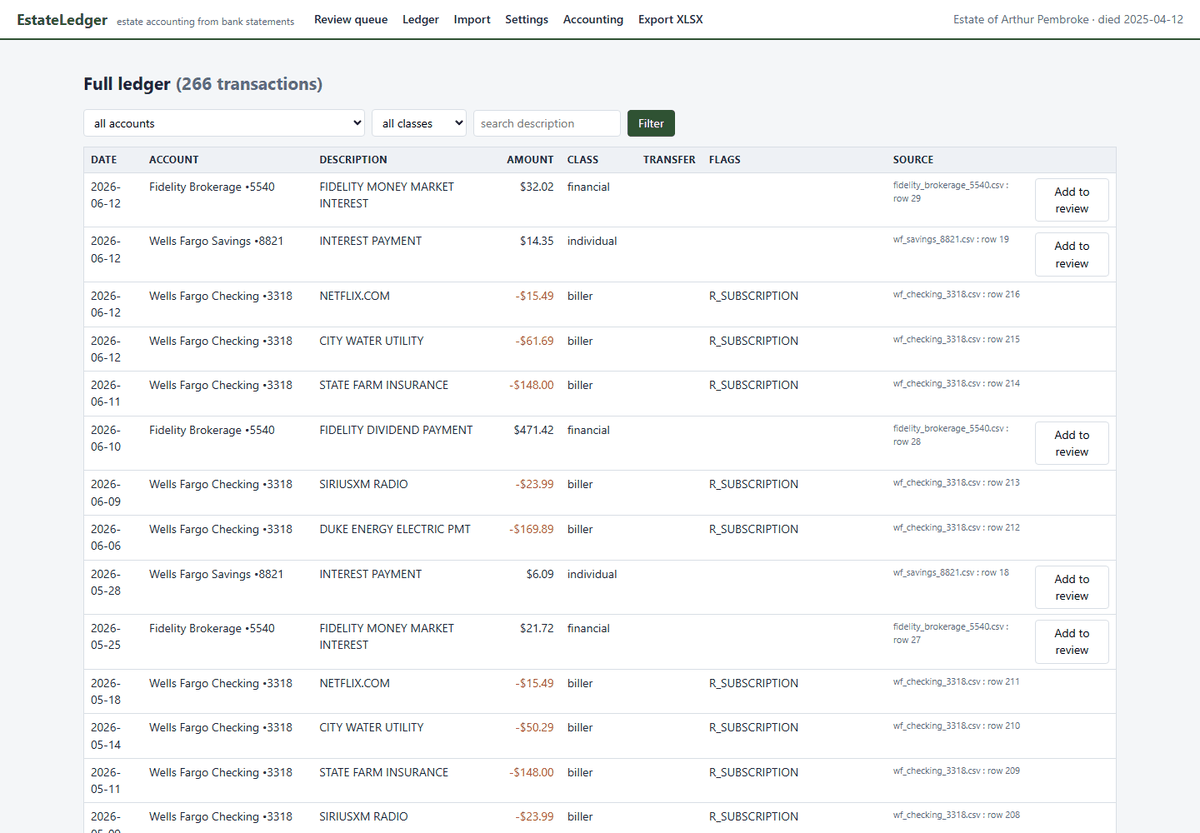
Nine sheets: Summary, Exceptions, Exception Detail, Receipts, Disbursements, Distributions, Reconciliation (with live formulas), Data Issues, and the full traceable Ledger. Every row on every schedule carries the source statement file and row number it came from.
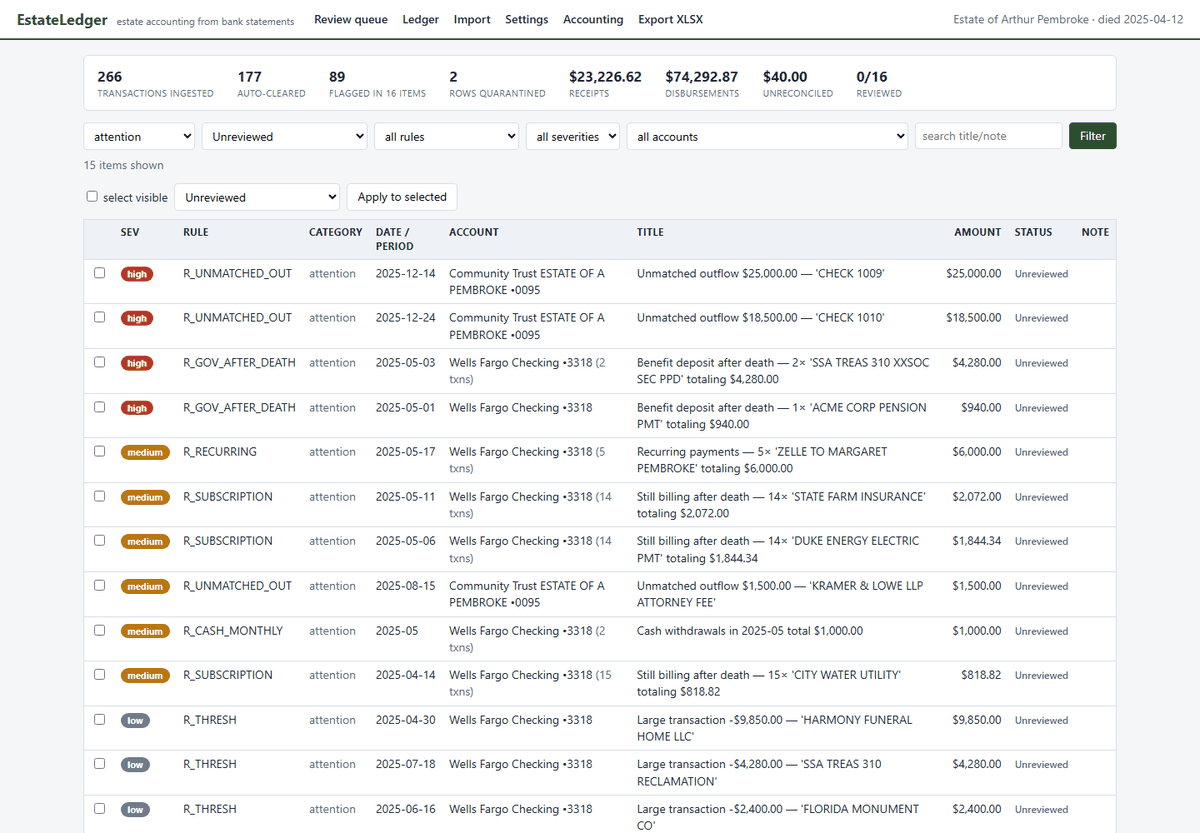
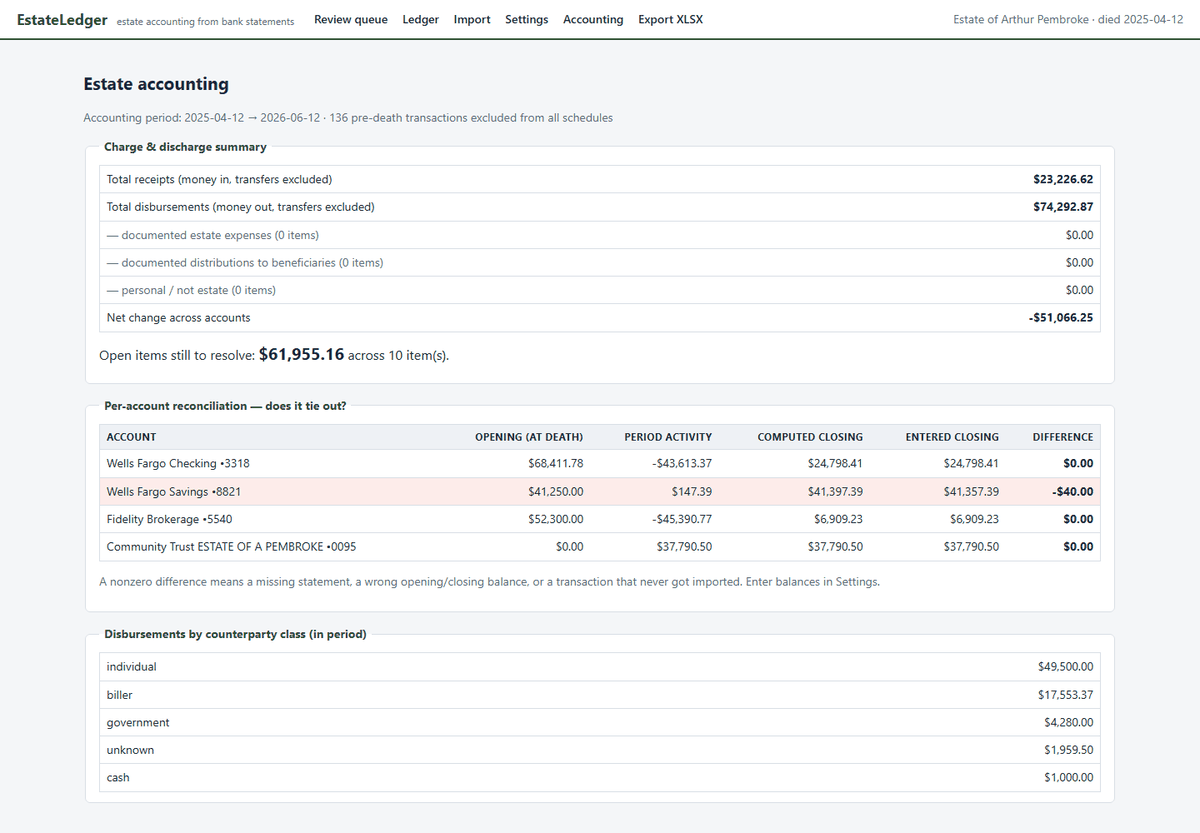
Two things in the sample are there on purpose. The savings account is off by $40 and two items are left open — an ATM withdrawal with no receipt, and a pension payment received after the death that hasn't been clawed back yet. A real accounting has loose ends, and the honest thing to do is show them on the face of the document rather than quietly plug the numbers. That's what the software does.
What it looks like
Screens from the demo estate that ships inside the program. It is a local web page served on your own machine — no account, no cloud, nothing leaves the computer.
Your browser and Windows will both try to stop you
Expect two warnings, in this order. Neither one means anything was found in the file — both are reputation checks, and a small program that hasn't been downloaded many times yet fails them by default. Here's exactly what you'll see and what to click.
1. Your browser blocks the download
The download may stop straight away with something like "EstateLedger.exe was blocked" or "This file isn't commonly downloaded."
- Microsoft Edge — open the Downloads panel (top right), hover the blocked item, click the ··· menu → Keep. If it then asks again, choose Show more → Keep anyway.
- Chrome — open the Downloads panel, find the blocked item and click Keep (or the ▾ arrow → Keep).
2. Windows blocks the first run
When you double-click the saved file, Windows may show a blue box that says "Windows protected your PC." Click the small More info link, then Run anyway. You only have to do this once, ever.
Why this happens
Neither warning is a virus detection. Both come from Microsoft SmartScreen, which trusts a program based on how many copies it has seen and whether it carries a paid code-signing certificate. EstateLedger doesn't have one yet — that's a cost decision on our side, not a comment on the file. A certificate is the first thing that gets bought once this pays for itself. Until then we'd rather warn you in advance than have you meet a red screen cold, in the middle of settling a parent's estate.
If your antivirus quarantines the file outright rather than just warning, please tell us which antivirus it was — those are false positives we can report and get cleared, and we'd rather hear about it than lose you quietly.
If you'd like to verify you got the genuine file, its SHA-256 checksum is:
cc7fc04e59f152f55a8125b847a1ade34ddbb27e6e57ff9c8f4c5bcd95f5c25b
In PowerShell:
Get-FileHash .\EstateLedger.exe -Algorithm SHA256
Fittingly, checksums are how the software itself proves your figures: every statement file you import is fingerprinted the same way inside the workbook.
Running it
- Save the file anywhere — your Desktop is fine. There's no installer and nothing is added to your system.
- Double-click it. Get past the SmartScreen box above if it appears.
- Accept the terms. The first screen shows the terms you're agreeing to — chiefly that this is a bookkeeping tool rather than legal or accounting advice, and that you check the accounting before anyone relies on it. It's shown once.
- Wait a few seconds. Your browser opens by itself with EstateLedger's home page. Nothing is on the internet — that page is coming from the program running on your own computer.
- Click "Open the demo estate" to look around a complete worked example first, or "Open my estate" to start on the real statements.
To close it, use the Quit button on the app's home page. Your estate file lives in a folder on your own disk and stays there.
When you're ready to export
Do the whole job first. When you click Export and decide the accounting is what you need, buy the license, and you'll get a key by email from Gumroad. Paste it into the app once and the export unlocks — the check happens on your own computer, so EstateLedger still never goes online.
Buy the export license — $59 $89 $59 launch price · one-time, per estate · 7-day money back guarantee · sales tax or VAT may be added at checkout depending on where you live
Can't find the key? Gumroad emails it in the purchase receipt, it's in your Gumroad library, and you can look it up at gumroad.com/license-key-lookup. If it still isn't turning up, write to swm.lee0294@gmail.com and we'll sort it out.
If it isn't right for you, there's a 7-day money back guarantee. You shouldn't need it — everything except the export is free, so you can see your own accounting on screen before paying anything. But if you buy and the workbook still isn't what you needed, you have seven days to get your money back. Reply to your Gumroad receipt or write to swm.lee0294@gmail.com.
Before you download
- Is there a Mac version?
- Not yet — Windows only. An unsigned Mac app is harder to open than the Windows warning above, so a Mac build will ship properly signed and notarized or not at all.
- What Windows versions?
- Windows 10 and 11, 64-bit. It's built and tested on Windows 11; it should run fine on 10, but if you hit anything odd there, tell us and we'll fix it.
- Does it need internet?
- No — it makes no network connections at all, including for the license check. You could unplug the internet and it would work identically.
- What if my bank only gives PDF statements?
- The estate account you open usually has full CSV export. For the decedent's older accounts, ask the bank's bereavement desk for transaction history, use a PDF-to-CSV converter, or type the handful of months into a spreadsheet and save as CSV.
- Do I need one license per estate?
- Yes — the $59 is one-time per estate, not a subscription. If you're administering two estates, that's two licenses.
Download EstateLedger for Windows 13.6 MB · free · nothing to sign up for By downloading and using EstateLedger you agree to the Terms of Use. EstateLedger is a bookkeeping tool, not legal, tax or accounting advice — you review and approve every figure before anyone relies on it. See also the Privacy Policy.