For executors & administrators
The estate accounting that ties out to the penny.
EstateLedger turns the deceased's bank statements into a clear, traceable estate ledger — the accounting document beneficiaries and the court actually want to see. It reconciles every account to zero, catches money that's still leaving after the death, and backs every figure with the exact statement line it came from.
Why executors use it
Checklist apps track what you type in. EstateLedger audits what the bank says actually happened — which is what holds up when an accounting is questioned.
Reconciled to the penny
Enter each account's balance at the date of death and at closing. EstateLedger checks opening + activity = closing for every account and shows you, to the dollar, how much is unexplained. A nonzero difference means a missing statement or an unimported transaction — found before a beneficiary finds it. Transfers between the estate's own accounts are matched automatically so nothing is double-counted.
Catches money still leaving after the death
Built-in rules surface subscriptions and premiums still billing the deceased, and Social Security or pension deposits that arrive after death and may have to be returned — plus large unmatched withdrawals and recurring payments to individuals. You review and decide on each one; nothing is classified for you.
Every figure has a receipt
Each row on every schedule carries its source statement file and row number, and each source file is fingerprinted (SHA-256) inside the workbook. When someone asks "where did this number come from?", you point at the bank statement line — not at a cell you typed.
Private by design — runs on your computer
EstateLedger makes no internet connections. There are no accounts, no uploads, and no subscription. The estate file is a single document on your own disk. A death in the family is not a reason to hand a parent's bank statements to a website.
How it works
Three steps, all on your own computer.
Import
Load CSV statements for the estate account and the decedent's accounts. A column-mapping screen handles the usual bank layouts; duplicate and overlapping statements are detected, and unreadable rows are set aside rather than silently dropped.
Review
The rules clear the routine activity and queue what needs your eyes, each with a plain-English reason it was flagged. Classify every item — estate expense, distribution, personal, or needs documentation. Your notes are preserved when rules re-run.
Export
Produce a nine-sheet workbook: receipts, disbursements, distributions by beneficiary, the per-account reconciliation with live formulas, and the full traceable ledger. Hand it to beneficiaries or your attorney, or use it to fill your state's court forms.
What you actually hand over
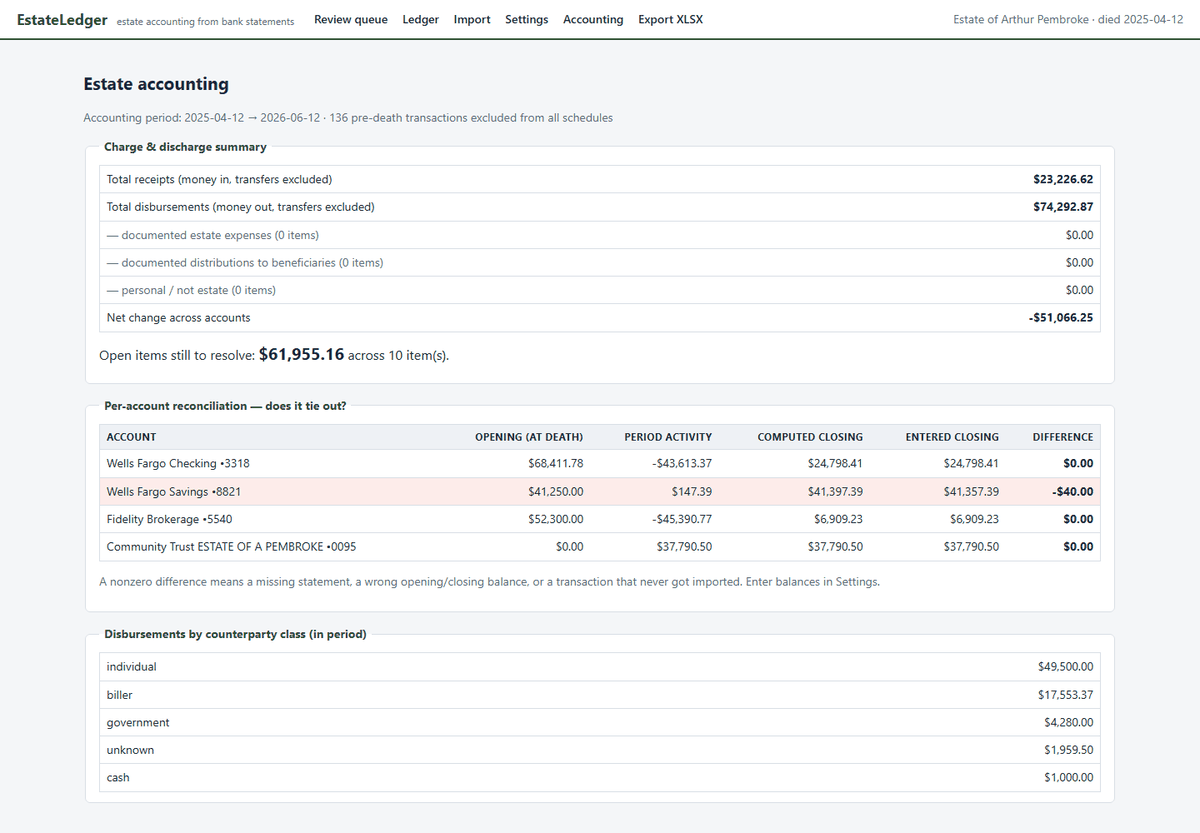
Rather than describe the output, here it is. This workbook is a real export, produced by EstateLedger from the demo estate that ships inside it — Arthur Pembroke, four accounts, fourteen months of statements.
Download the sample workbook (.xlsx, 43 KB)
Nine sheets — Summary, Exceptions, Exception Detail, Receipts, Disbursements, Distributions, Reconciliation with live formulas, Data Issues, and the full traceable Ledger. Open the Distributions sheet and you'll see each payment tied back to the statement file and row number it came from; open Summary and you'll see $568.21 of the decedent's subscriptions that kept billing after the death, caught and disclosed rather than buried in "miscellaneous".
The loose ends are in there on purpose. The sample's savings account is off by $40 and two items are left open. A real accounting has gaps, and the right thing to do is show them on the face of the document instead of quietly plugging the numbers — which is exactly what a beneficiary's attorney goes looking for.
Try the whole thing first. Pay at the end.
$89$59
Launch price · regularly $89
Downloading, importing your statements, reconciling every account and reviewing every flagged item cost nothing, with no time limit. The $59 is one-time, per estate, and it unlocks one thing: exporting the finished workbook. So you find out whether the software does what you need before you've paid anything.
Backed by a 7-day money back guarantee — though the point of the free review is that you shouldn't need it. Software bought to administer an estate is generally a reimbursable administration expense; keep your receipt.
Windows 10 or 11 · 13.6 MB · no installer, no account, nothing uploaded · what the download page covers
Already know you want it? Buy the export license — $59. Purchase is handled on Gumroad; you'll get a license key by email and paste it into the app once to unlock the export on your own computer. Sales tax or VAT may be added at checkout depending on where you live.
Free tools for executors
No sign-up, no email gate. Use them whether or not you ever download the software.
Executor fee calculator
The statutory executor commission for California, New York, Florida and Texas, bracket by bracket, straight from each statute — and what "the estate's value" actually means in each one.
Estate accounting template (Excel)
Inventory, receipts, disbursements, distributions and a reconciliation sheet that has to come to zero. The by-hand version of what the software produces.
Guides for executors
Plain-language answers to the money questions that come up while settling an estate.
-
What Is an Estate Accounting? An Executor's Plain-English Guide
What an estate accounting must show, how to build one from the bank statements, and why every account has to reconcile before you distribute.
-
Estate Bank Account After Death: An Executor's Guide
Why you open a separate estate account, what you need to set one up, and how to keep its statements clean so the final accounting reconciles.
-
Date-of-Death Account Balance: How to Get the Bank's Letter
The starting figure your whole accounting is built on — what it means, how to get it from the bank, and why every reconciliation begins here.
-
Social Security Payments After Death: Do You Have to Pay Them Back?
The benefit for the month of death usually has to be returned — here's why that happens, how the bank typically reclaims it, and what an executor should actually do.
Common questions
- What's free and what costs $59?
- Downloading it, importing your statements, reconciling every account and reviewing every flagged item are free, with no time limit. The one-time $59 — per estate — unlocks exporting the finished nine-sheet workbook. You find out whether it does what you need before you've paid anything. Download it here.
- Is there a Mac version?
- Not yet — Windows 10 and 11 only. An unsigned Mac app is harder to open than the Windows warning you'll see on first run, so a Mac build will ship properly signed and notarized or not at all.
- Is EstateLedger a court filing?
- No. It produces the verified, traceable workbook behind your numbers. Many estates settle informally once beneficiaries see a clean accounting; if your court requires its own forms, you fill them from this workbook instead of from a shoebox of statements.
- Where does my data go?
- Nowhere. EstateLedger runs on your computer and makes no network connections. There's no account to create and nothing is uploaded.
- What if my bank only provides PDF statements?
- The estate account you open usually has full CSV export. For the decedent's older accounts, ask the bank's bereavement desk for transaction history, use a PDF-to-CSV converter, or type the handful of months into a spreadsheet and save as CSV.
- Is this AI?
- No. Every flag comes from a rule you can read and adjust. The same statements always produce the same result — which is what you want in a document a beneficiary might question.